Multi-Entity & Firm Management
Adding and switching between entities is in Manual Sections 1 & 2. Accounting-firm/practice mode is not yet covered in the printed User Manual.
Topics in this section
- Adding Additional Entities
- Branches & Units
- Switching Between Entities
- Accounting Firm Mode
2 guides • 0 video tutorials available for this topic. Browse the Support Center or use search above.
Guides
Adding & Switching Between Entities
Your subscription plan determines how many entities (companies) you can run from one account. "My Dashboard" lists every entity you administer side by side, with a New Entity card to add another when your plan allows it — open any entity from here to switch your active company.
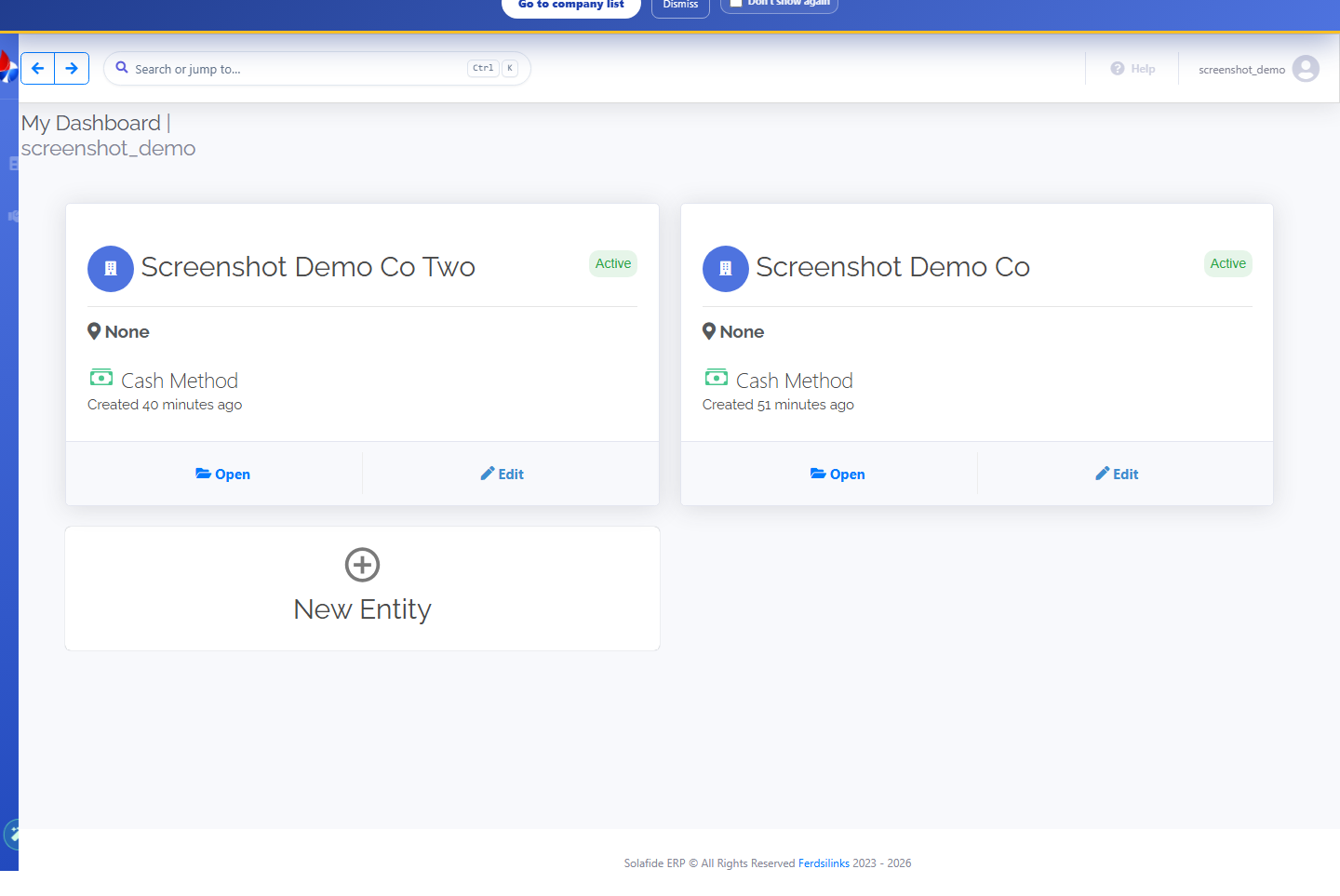
- Click Open on an entity card to switch into it.
- Click New Entity to add another company once your plan allows it.
- Each entity keeps its own ledger, customers, and settings.
- Optionally organise an entity into branches for per-location tracking.
Accounting Firm / Practice Mode Overview
Accounting firms and bookkeeping practices can manage several client entities' books under a single practice account, with firm-level plan tiers that scale by client volume.
This mode is not yet documented in the printed User Manual. If you run a practice and want to set this up, contact support for a guided walkthrough.